

WhatsApp-first support operations for multi-brand teams
Multi‑Brand Support Operations (One Workflow, Many Brands)
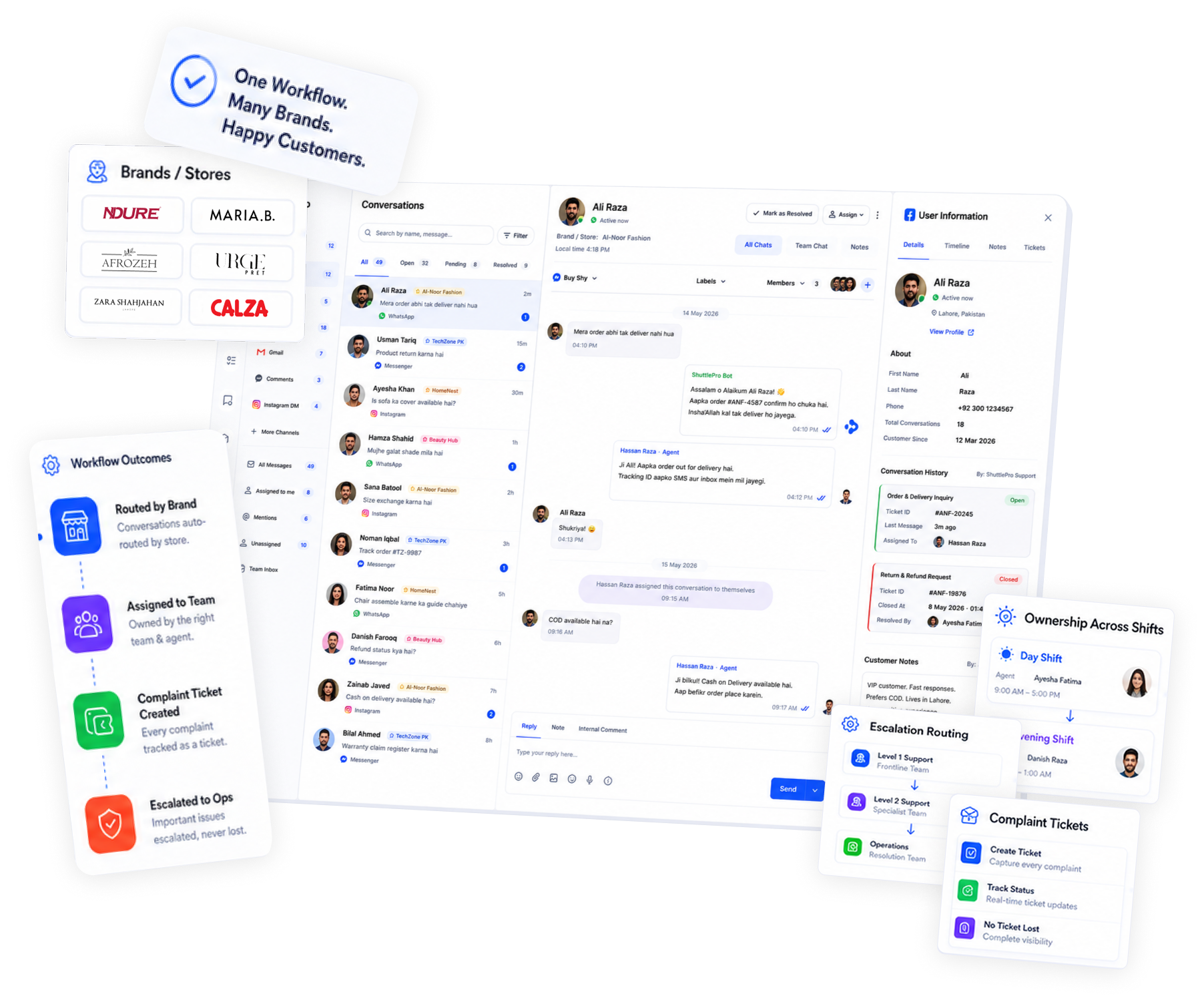
Route conversations by brand/store, keep ownership clear across shifts, and track complaints with tickets—so escalations don’t get lost between teams.
Typical go-live: 2 -5 Days
ShuttlePro helps multi‑brand ecommerce teams manage WhatsApp-first support in one system—routing conversations by brand/store, tracking exceptions with tickets, and monitoring performance with KPIs and audit trails.
Built for Pakistan ecommerce realities (COD + volume)
Why it Matters
What goes wrong
- Customers message the “wrong” page/number
- Teams forward screenshots between groups
- Ownership is unclear across shifts
- Complaints aren’t tracked consistently
Outcome: one workflow with clear routing and accountability.
What changes with ShuttlePro
- Route each message into the correct brand/store queue
- Assign ownership and track follow-ups as tickets
- Keep QA and escalation reviews traceable via audit trail
- Monitor workload and outcomes by queue/brand (where configured)
The multi-brand playbook
Step 01
Direct conversations into the right queue using channel source/page mapping and rules.
Step 02
Use bots/flows for common intents and consistent ticketing for exceptions.
Step 03
Monitor workload and outcomes per queue/brand (where configured) for better staffing and QA.
How it Works
Set up brands, queues, and routing rules—then keep escalations accountable through tickets, KPIs, and audit trails.
Define brands/stores and queues
Create a clear structure (Brand A / Brand B / Brand C) so routing is predictable.
Set routing rules
Route by brand/page/source and use rules to keep ownership clear (where configured).
Use tickets for complaints & escalations
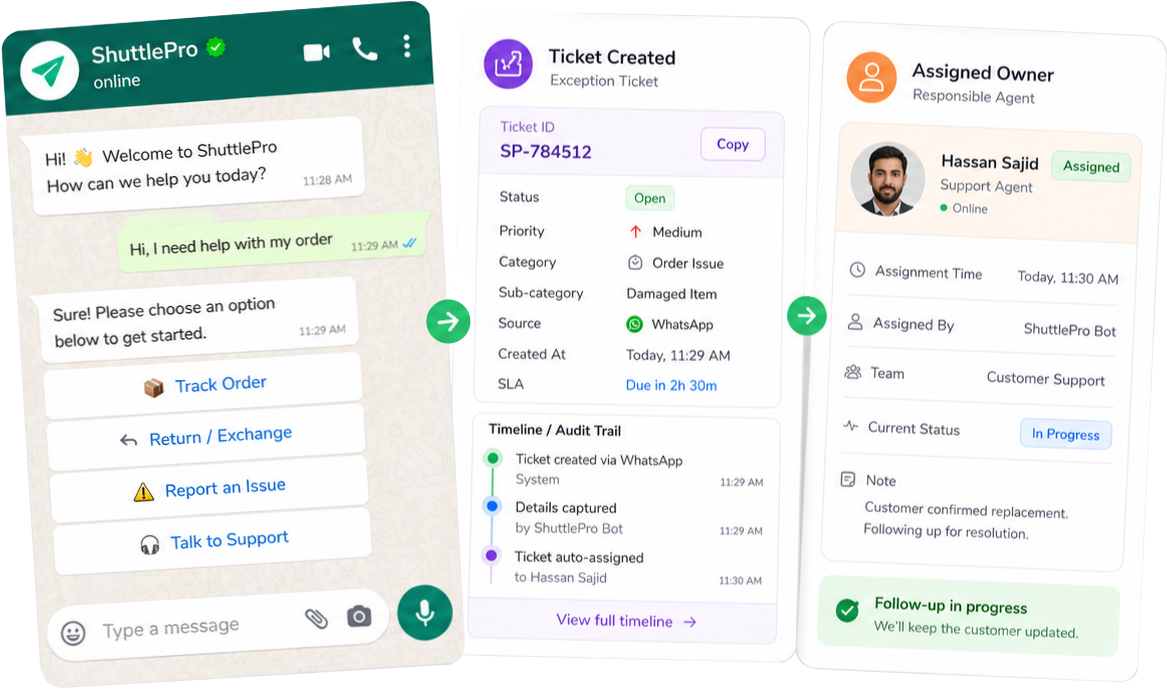
Convert exceptions into tickets so follow-ups are tracked with ownership
Review by queue/brand
Monitor performance and accountability using KPIs and audit trails (if enabled).
Queue-based Routing
Brand A/B/C queues keep work separate but inside one workflow.
Clear Ownership
Tickets for Exceptions
Complaints and follow-ups stay accountable across teams.
Reviewable history
Key capabilities for multi-brand teams
Unified inbox with multi-queue handling
Run multiple brands/stores in one system while keeping queues separated.
Assignments and handoffs
Keep ownership clear across shifts and teams—reduce duplicate replies.
AI bots + interactive flows (optional)
Automate repeatable intents and route exceptions to humans.
Ticketing for escalations and tracked follow-ups
Turn complaints into accountable resolution workflows.
KPIs and audit trails (if enabled)
Monitor quality and review what happened during escalations.
Commerce context integrations (where configured)
Connect Shopify, OMS, or couriers via APIs/webhooks to improve order-status handling.
The multi-brand playbook
Keep work organized while staying in one system.
Handle with routing + automation for repetitive intents.
Clear ownership and tracked follow-up, even across teams.
Standardize workflows per store/brand (where configured)
Reconstruct disputes without screenshots and guesswork.
Internal notes + ownership keep transitions clean.
What makes ShuttlePro different
Why teams switch
- Multi-brand routing + accountability in one workflow (not separate tools per store)
- WhatsApp-first by design, expandable to omnichannel as you scale
- Tickets and audit trails prevent “lost escalations” across brands
Before vs After (micro)
Before:
forwarded screenshots, mixed ownership, unclear follow-up.
After:
Routed queues, assigned owners, tickets, history
FAQs
How does ShuttlePro help teams manage multiple brands or stores from one system?
ShuttlePro helps multi-brand and multi-store teams manage customer conversations inside one CRM + AI Bots workflow while keeping work separated by brand, store, page, queue, or channel.
This means a team can manage Brand A, Brand B, and Brand C from one system without mixing ownership or losing visibility. Conversations can be routed through the Unified Inbox, assigned to the right agent or team, and tracked with statuses, tickets, internal notes, KPIs, and audit history.
Can ShuttlePro route conversations by brand, page, store, or channel?
Yes. ShuttlePro can support routing rules based on the connected channel, page, brand, store, or source where configured. This helps ensure that customer conversations reach the correct queue or support team instead of being handled randomly.
For example, conversations coming from WhatsApp CRM, Facebook Messenger, Instagram, email, or other channels can be organized into separate workflows while still staying inside one Shared Inbox or unified support system.
How does ShuttlePro keep support handling consistent across multiple brands?
ShuttlePro helps teams standardize support handling by using shared workflows, labels, statuses, internal notes, ticket categories, and routing rules across brands or stores.
This is useful when different teams handle similar customer issues such as order status, COD confirmation, returns, complaints, product inquiries, or delivery exceptions. Managers can define which queries should stay inside the Unified Inbox, which should move into Ticketing, and which repetitive queries can be handled through AI Bots or automation.
How does ShuttlePro manage complaints and escalations across multiple brands?
ShuttlePro helps multi-brand teams manage complaints and escalations through structured Ticketing instead of forwarding screenshots or messages between teams.
If a customer issue needs follow-up, the conversation can create a ticket with ownership, status, internal comments, and follow-up history. This helps teams track which brand or store the issue belongs to, who is responsible, what action was taken, and whether the case has been resolved. Managers can also review important actions through Audit Trail for better accountability.
Can managers review performance by brand, queue, or team?
Yes. Where configured, ShuttlePro can help managers review support workload and performance by brand, queue, agent, or team.
Managers can monitor conversation volume, pending work, resolved cases, ticket activity, and escalation patterns across different brands or stores. When combined with Agent Performance and Audit Trail, this helps supervisors identify overloaded queues, inconsistent handling, missed follow-ups, and areas where coaching or staffing adjustments may be needed.
Can a business start with one brand and later expand to multiple brands or stores?
Yes. A business can start with one WhatsApp-first support workflow using WhatsApp Business API and later add more brands, stores, pages, or channels as operations grow.
ShuttlePro is designed to scale from a simple WhatsApp AI Chatbot or Interactive Bots setup into a multi-brand support workflow with routing, assignments, automation, ticketing, KPIs, and audit trails. This is especially useful for Customer Support Teams, eCommerce Ops, and Pakistan Retail Playbooks style operations where multiple brands need one controlled support process.
Want a multi-brand routing plan for your support team?
Chat on WhatsApp and share your number of brands/stores + top 5 intents. We’ll recommend the simplest rollout.
Helpful to share: channel list (WhatsApp / Instagram / Facebook / email) + how your team is structured today.