

WhatsApp-first support ops for Pakistan ecommerce
WhatsApp CRM for Ecommerce Support Teams in Pakistan
Typical go-live: 2-5 days
Why it Matters
A WhatsApp CRM turns WhatsApp support into a team workflow with ownership, tracking, and accountability.
When WhatsApp support runs on personal phones:
• Ownership is unclear
• Follow-ups get missed
• Complaints aren’t tracked
• Quality varies by agent
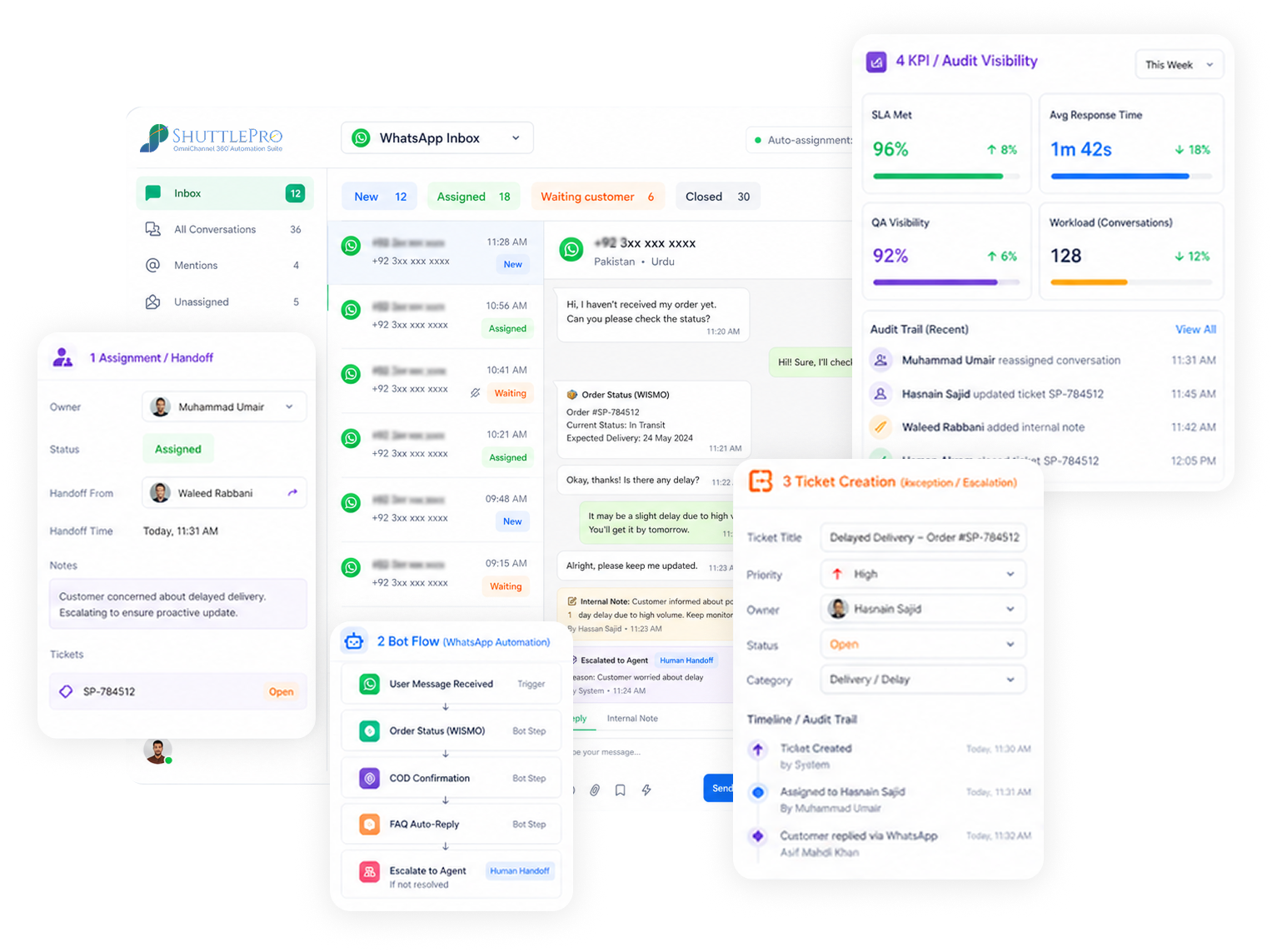
A WhatsApp CRM is more than “chat.” It’s support operations:
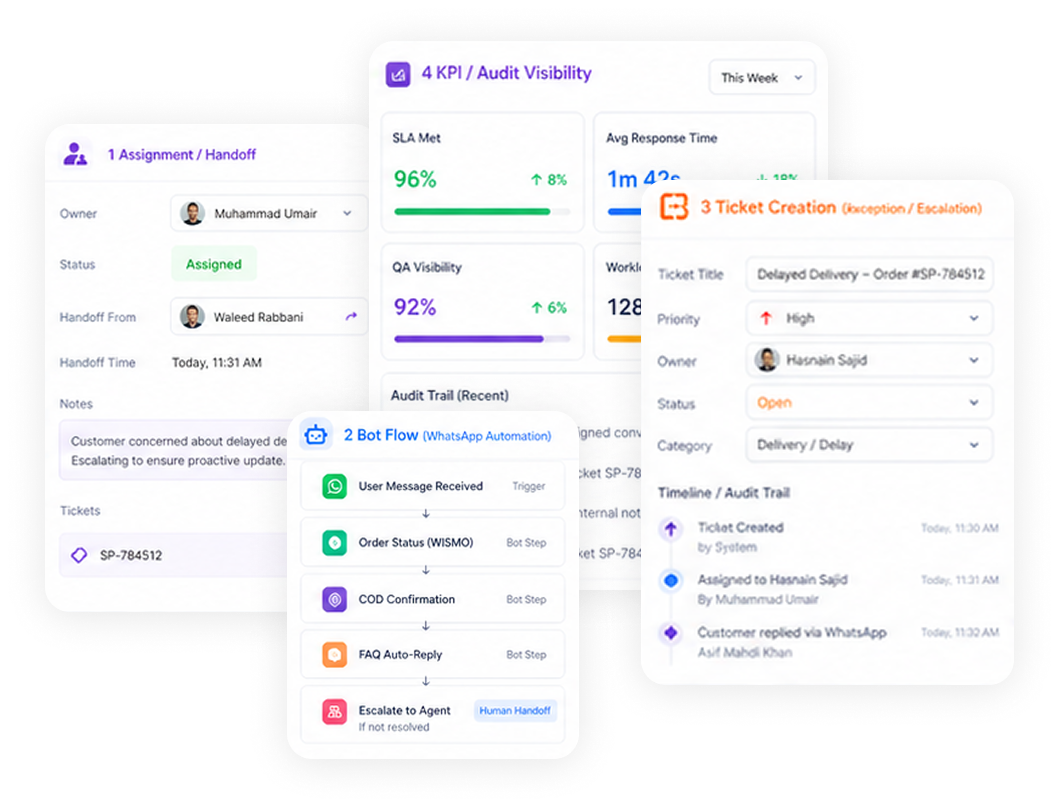
• Shared inbox with assignment and ownership
• AI bots and interactive flows for repetitive intents
• Ticketing for exceptions (complaints, escalations, follow-ups)
• KPIs + Audit trails for accountability
How it Works
Operational setup that keeps WhatsApp support organized—then expands to more channels when needed.
Typical go-live: 2-5 Days
1
Connect WhatsApp (API-based setup for teams)
Enable team access and routing using WhatsApp Business API (where applicable).
2
Route conversations into a shared inbox
One queue for the team—assignment, collaboration, and ownership.
3
Automate top intents (order status, COD, FAQs)
Use AI bots and interactive flows (buttons/lists) to reduce repetitive load.
4
Convert exceptions into tickets
Complaints and follow-ups become tracked tickets with clear ownership.
5
Track performance with KPIs + audit trail
Improve coaching and consistency with dashboards and traceable action history.
Why it Matters
A WhatsApp CRM turns WhatsApp support into a team workflow with ownership, tracking, and accountability.
• Team inbox with ownership and assignment
• Interactive WhatsApp flows (buttons/lists) for structured inputs
• AI bots for repetitive intents with safe escalation
• Ticketing for complaints and tracked follow-ups
• KPIs and audit trails for accountability
Use cases (Pakistan Ecommerce)
Workflows that reduce repetitive load and keep exceptions tracked—especially during sale-day spikes.
Order status automation (reduce WISMO)
Answer “where is my order?” fast—escalate exceptions to agents.
COD confirmation workflows
Structured confirmations via interactive flows—consistent handling.
Complaint intake → ticket
Convert complaints into tracked tickets with ownership and priority.
Returns/exchanges follow-ups
Keep multi-step follow-ups from getting lost in chat threads.
Sale-day volume triage
Bots handle repetitive volume; agents focus on exceptions.
Expandable to omnichannel
Add Instagram/Facebook/email when needed—same workflow, one inbox.
Differentiators
What makes ShuttlePro different
Own WhatsApp-first support today, then expand to omnichannel without rebuilding your workflow.
- WhatsApp-first CRM + expandable to Instagram/Facebook/email when needed
- Support operations workflow: inbox → tickets → outcomes
- Commerce context integrations for accurate order-status handling (where configured)
Before
WhatsApp on phones + spreadsheets + untracked complaints
With ShuttlePro
Shared inbox + automation + tickets + KPI/audit visibility
FAQs
How is ShuttlePro WhatsApp CRM different from using the WhatsApp Business App?
The WhatsApp Business App is suitable for basic one-to-one replies, while ShuttlePro WhatsApp CRM is built for team-based support. It provides a unified inbox where conversations can be managed by status such as Pending, Active, Resolved, and Closed.
Managers can also control visibility. In “Everyone” mode, agents can view active conversations handled by other team members. In “Assigned Only” mode, active conversations are visible only to the assigned agent, while Pending and Closed conversations remain accessible based on settings.
Is this different from a WhatsApp shared inbox?
ShuttlePro organizes WhatsApp conversations inside a unified inbox with clear ownership, statuses, and visibility rules. New conversations can appear in Pending, handled conversations move to Active, and completed conversations can move to Resolved or Closed.
This helps teams avoid duplicate replies, missed follow-ups, and confusion about which agent is handling which customer.
How do Interactive Bots, Chatbots, and ShuttleBot AI work inside ShuttlePro WhatsApp CRM?
ShuttlePro offers different automation options for different workflows. Interactive Bots use buttons, lists, and guided steps. Chatbots follow predefined flows. ShuttleBot AI can understand and respond to customer queries where AI automation is enabled.
These options can support FAQs, product questions, order-related queries, complaints, and follow-ups. If human support is needed, the conversation can move to an agent or ticket.
Can ShuttlePro WhatsApp CRM help with order confirmation, order status, and post-purchase support?
Yes. When any new order is created in the system, ShuttlePro can trigger an automated WhatsApp order confirmation message based on the business workflow.
This is not a normal message, and it does not require Interactive Bot, Chatbot, or ShuttleBot AI. Businesses can configure automation rules to send order confirmation messages directly when new orders are created.
How does ShuttlePro handle WhatsApp complaints and escalations?
When a WhatsApp conversation includes a complaint, return request, delivery issue, payment concern, or escalation, ShuttlePro can create a tracked support ticket.
The ticket stays connected to the original conversation, so the handler can read the customer context, reply when needed, update the ticket, and add internal comments for the team.
Can teams start with WhatsApp CRM and later expand to other channels?
Yes. Teams can start with WhatsApp CRM for conversations, assignments, automation, order confirmations, complaints, and tickets.
Later, they can add Instagram, Facebook, email, comments, and webchat while keeping the same support workflow for ownership, automation, ticketing, KPIs, and audit trails.