

WhatsApp-first support automation for Pakistan retail
Unified Inbox for Customer Support Teams
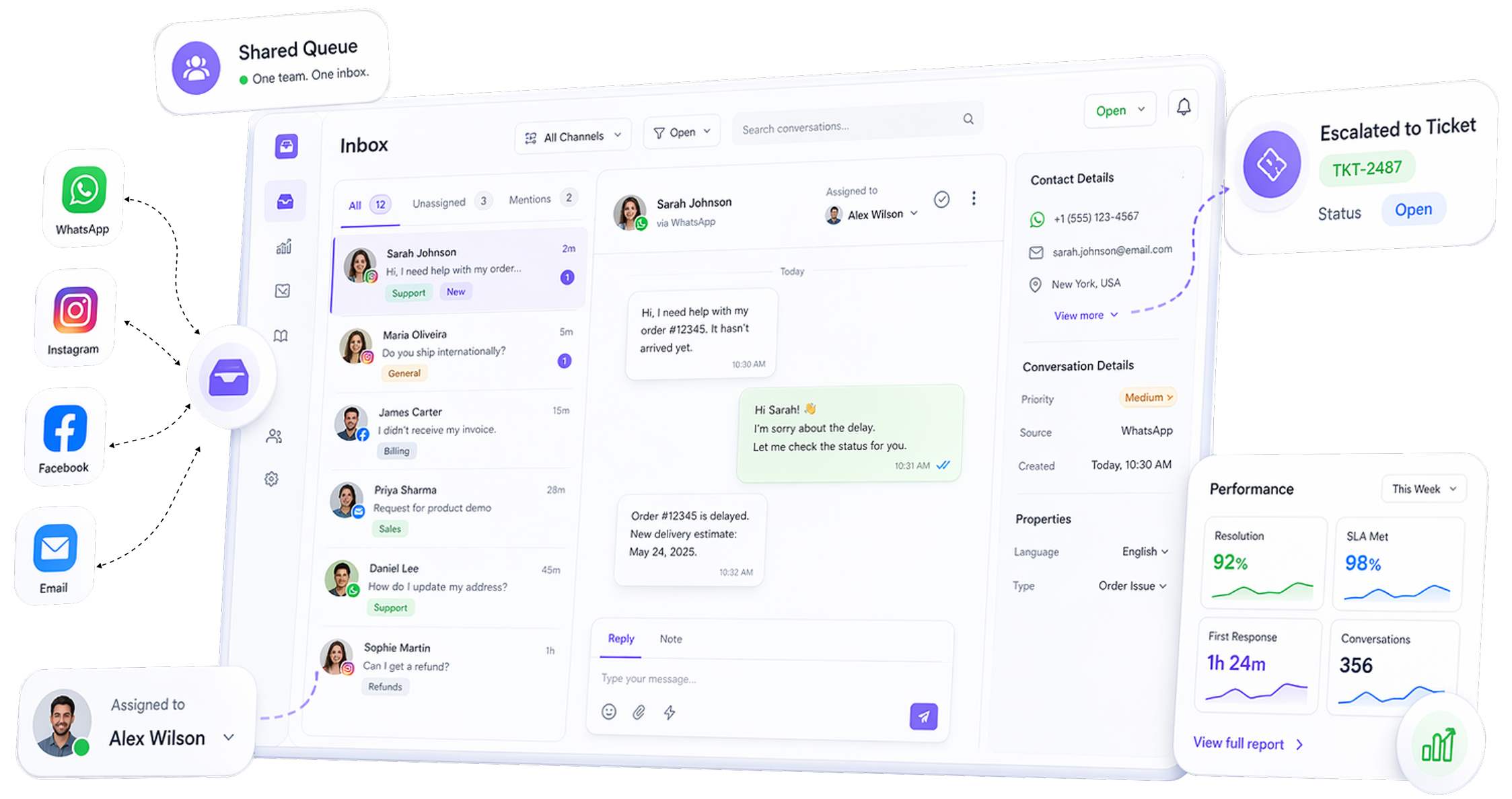
Handle WhatsApp, Instagram, Facebook and email in one shared queue—so every conversation has an owner, teams can collaborate, and escalations become tracked tickets.
Typical go-live: 2 -5 Days
Explore: CRM Overview • AI Bots • Ticketing • Agents KPI • Audit Trail
Why it Matters
One queue, one owner, fewer missed follow-ups
Common Problems
• Duplicate replies or agents stepping on each other
• Missed follow-ups and unresolved complaints
• Handovers without context
• No clear accountability for response quality
Outcome
Make messaging operational
WhatsApp Shared Inbox
Escalatino to Tickets
Customer Support
How it works
Set up team ownership in 5 practical steps
Outcome
- Connect channels (WhatsApp-first, then Instagram/Facebook/email)
- Centralize conversations into one team queue
- Define assignment rules (teams, shifts, queues, tags)
- Collaborate with context (internal notes and handoff)
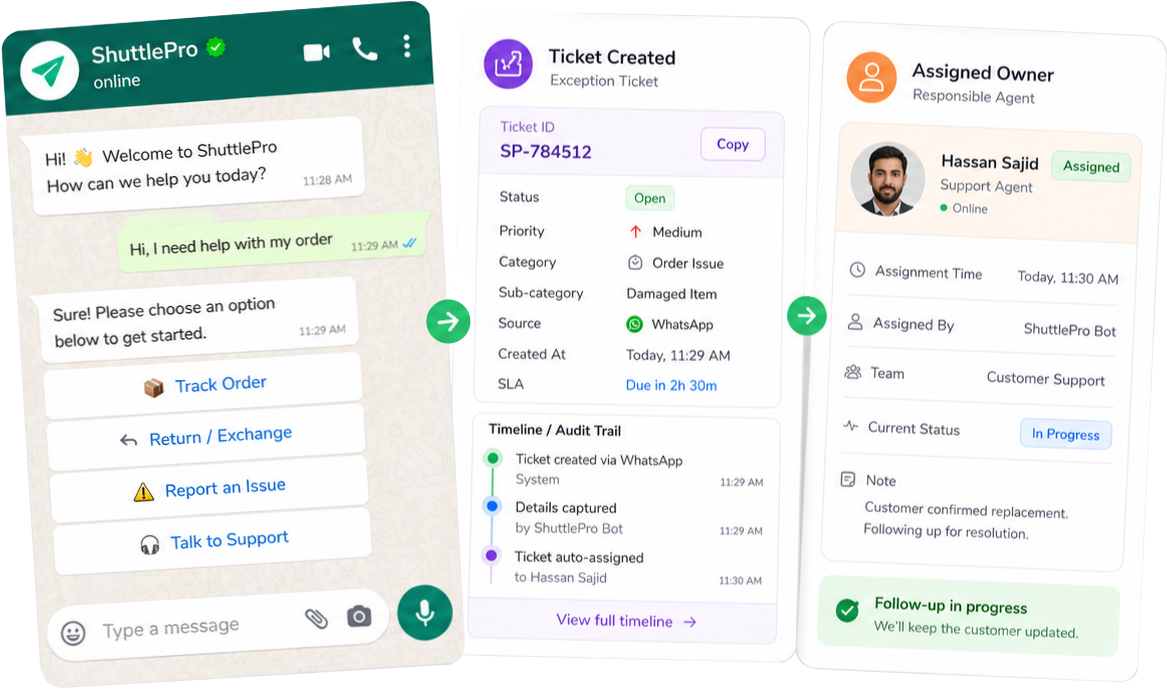
- Escalate exceptions by converting to tickets when follow-up must be tracked.
Recommended Inbox Standards
• Owner for every conversation
• Status (New / In progress / Waiting / Resolved)
• Escalation trigger (complaint, refund, repeat issue)
• Ticket rule for anything needing follow-up
Clear rules → Cleaner execution.
Key capabilities
What teams actually use every day
Outcome
• Shared team queue with clear ownership
• Assignments to agents/teams with handoff
• Internal notes for context and collaboration
• Labels & statuses to keep work organized
• Escalation to tickets for complaints and follow-ups
• Accountability via audit trails (who changed what)
Use Cases
Built for Pakistan ecommerce support workflows
Order status & delivery queries
Keep one thread with context and handoffs—escalate exceptions to a ticket.
COD confirmation flows
Route to the right owner; track disputes or no-response as follow-up work.
Complaint intake → ticket
Escalate serious issues to tickets so they don’t disappear in chat threads.
Returns & exchanges
Collect details, assign ownership, and keep follow-ups tracked until resolution.
Sale-day spikes
Maintain control during peak volumes with clear ownership and queue discipline.
Multi-brand support
Separate queues by store/brand while keeping shared reporting and visibility.
Pakistan Retail
Customer Support
Differentiators
More than a shared inbox—an ops workflow
From Chaos to Control
• Omnichannel: WhatsApp-first + Instagram/Facebook/email in the same workflow
• Escalation tracking: convert exceptions into tickets with owners
• Performance visibility: agent KPIs and workload trends
• Audit trail: action history for QA and accountability
Before
• Phones + personal WhatsApp
• Scattered DMs
• Missed follow-ups
• No ownership
With ShuttlePro
• Shared inbox
• Clear owners
• Ticket escalations
• KPIs + audit trail
FAQs
How does ShuttlePro’s unified inbox organize customer conversations?
ShuttlePro’s unified inbox brings customer conversations from WhatsApp, Instagram, Facebook, and email into one shared workspace, so support teams do not have to manage conversations separately across phones, social inboxes, or email tools.
Each conversation can be handled with clear ownership, status, labels, and internal context. This helps teams see which conversations are new, in progress, waiting, resolved, or need escalation. For teams handling high message volume, the unified inbox becomes the main operating layer for customer support, instead of just another messaging screen.
Can ShuttlePro’s unified inbox support multiple brands, stores, or teams?
Yes. ShuttlePro’s unified inbox can help teams manage conversations across multiple brands, stores, or support queues while keeping ownership clear. This is useful for retail and eCommerce businesses that operate more than one brand, location, page, or online store.
Teams can organize conversations by brand, channel, agent, queue, or workflow so the right person handles the right customer interaction. This helps multi-brand teams avoid mixing conversations, missing follow-ups, or losing visibility across support operations. For deeper multi-brand workflows, teams can also use ShuttlePro’s Multi-Brand / Multi-Store solution.
How do assignments, statuses, labels, and internal notes work in the unified inbox?
ShuttlePro’s unified inbox is designed to make support ownership visible. Conversations can be assigned to the right agent or team, and statuses can help teams understand whether a conversation is new, being handled, waiting for a customer, or resolved.
Labels help organize conversations by intent, such as order status, COD, complaint, return, exchange, product query, or escalation. Internal notes allow team members to share context without sending that information to the customer. Together, these features help support teams collaborate without losing context during handoffs.
How does ShuttlePro prevent duplicate replies and missed follow-ups?
Duplicate replies and missed follow-ups usually happen when multiple agents are working from different devices, inboxes, or platforms without clear ownership. ShuttlePro reduces this problem by giving teams one shared inbox where conversations can be assigned, tracked, and updated with statuses.
When every conversation has an owner and a visible workflow, agents can see who is handling what. This helps reduce agent collisions, repeated replies, unresolved conversations, and follow-ups that disappear inside long chat threads.
Can conversations from the unified inbox be escalated into tickets?
Yes. ShuttlePro’s unified inbox is connected with Ticketing & Complaints, so important conversations can be escalated into tracked tickets when follow-up is required.
This is useful for complaints, delivery exceptions, returns, refund requests, payment issues, repeat customer concerns, or any case that should not remain only inside a chat thread. Once escalated, the issue can have an owner, status, follow-up history, and accountability through Audit Trail.
How should a support team set up ShuttlePro’s unified inbox before going live?
For example, a team may set rules for order status, COD confirmation, complaints, returns, and sale-day support. Once these standards are set, agents can begin using the inbox quickly while managers monitor workload, ownership, and performance through Agent Performance and support workflows.