

WhatsApp shared inbox collaboration for teams & shifts
Team Collaboration for Support: Ownership, Handoffs, and Notes
A WhatsApp shared inbox lets multiple agents manage customer conversations from one WhatsApp number with assignment, notes, status tracking, and visibility. For ecommerce teams, it helps prevent duplicate replies, missed follow-ups, and unclear ownership.
ShuttlePro collaboration tools help support teams work together inside one inbox—assign ownership, leave internal notes, and hand off escalations cleanly without losing context.
Explore: Unified Inbox • AI Bots • Ticketing • Agents KPI • Audit Trail
Collaboration is a support operating practice (handoffs + ownership), not “chat internally.”
Why it Matters
- Handoffs are messy
- Context gets lost
- Multiple agents reply differently
- Escalations aren’t owned.
How it Works
1
Assign a conversation to an owner
Reduce collisions and keep one accountable owner per issue.
2
Add internal notes for context
Capture order IDs, courier details, and what has already been tried.
3
Hand off to another agent/team when needed
Ops, support, and supervisors can collaborate without losing the thread.
4
Escalate to ticket for tracked follow‑up
Exceptions and complaints become trackable (owner + priority + status).
5
Review actions later via audit trail
Understand what happened, when, and who changed what.
Key features
- Ownership and assignments
- Internal notes for context
- Clean handoffs across agents/teams
- Ticket escalation for exceptions
- Audit trail to review actions and changes
Tip: If you prefer fewer pages, this collaboration module can be merged into Unified Inbox
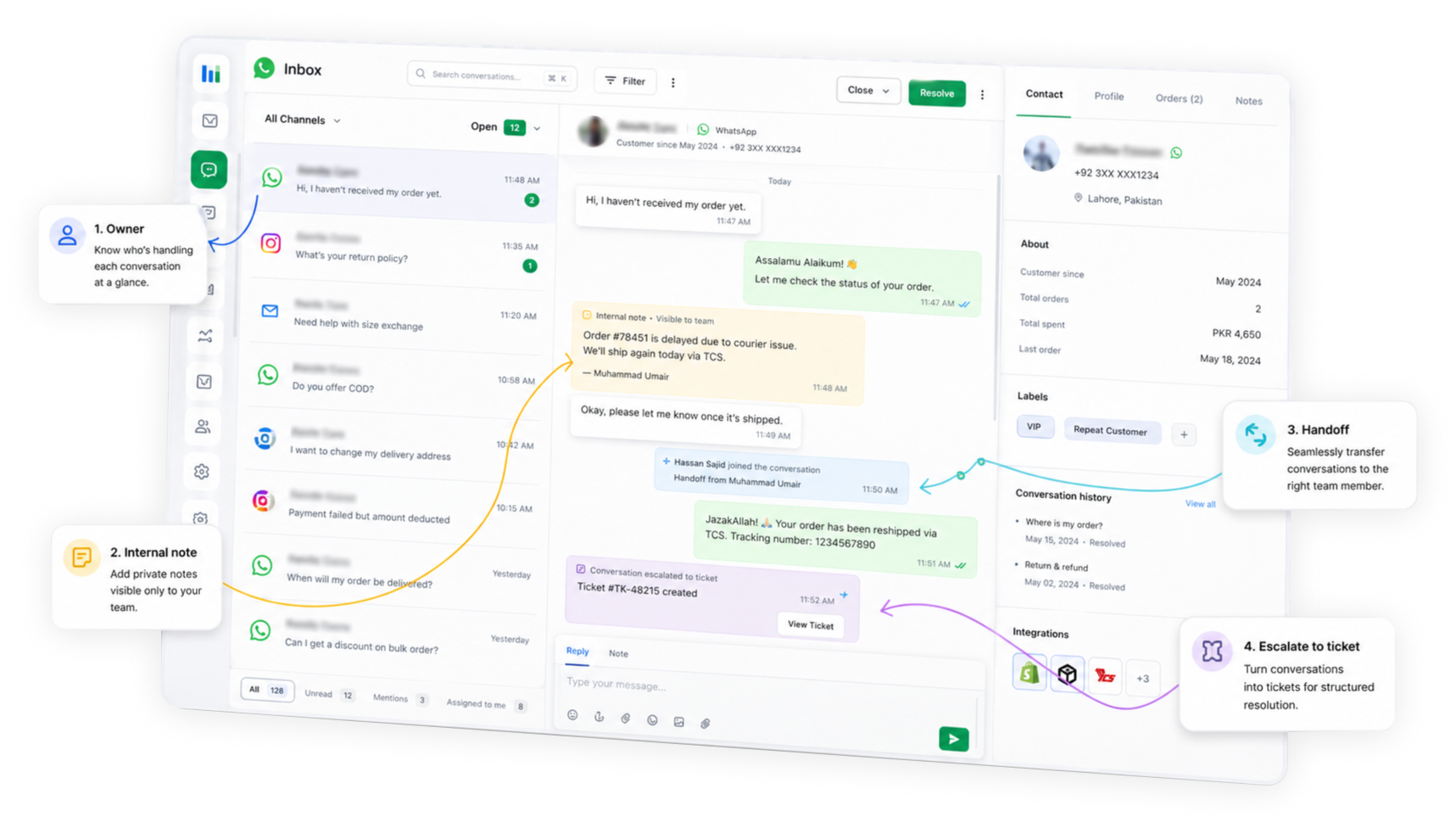
Owner
Internal Note
Handoff
Escalate to ticlet
Use cases (Pakistan Ecommerce)
Shift handoffs
Keep context without re-explaining or losing details.
Complaint escalation
Move from chat to ticket cleanly with ownership.
Sale-day volume
Maintain clear ownership under pressure and peak load.
Multi-brand support
Route to the right queue/store (where configured).
What makes ShuttlePro different
Collaboration connected to accountability—not a separate internal chat tool.
Same workflow as inbox + tickets
Assignments and handoffs sit inside the operational support flow.
Built for WhatsApp-first support
Designed around Pakistan ecommerce realities—mixed roles and high volume.
Audit trails support QA
Review actions and handoffs to improve consistency and coaching.
FAQs
How does ShuttlePro Shared Inbox help support teams collaborate on customer conversations?
ShuttlePro Shared Inbox helps support teams work together on customer conversations without losing ownership or context. Agents can manage conversations from connected platforms in one workflow, while managers can define how conversations are assigned, viewed, and followed up.
This is useful when multiple agents, shifts, or teams are involved in the same support operation. Instead of relying on personal phones, screenshots, or separate inboxes, ShuttlePro helps teams keep conversation ownership, internal context, handoffs, and escalations organized inside the support workflow.
Are internal notes visible to customers?
Are internal notes visible to customers?
Internal notes are designed for team collaboration. Customer visibility depends on channel behavior and configuration.
Are internal notes visible to customers in ShuttlePro Shared Inbox?
No. Internal notes are meant for team collaboration and are not sent as customer messages. Agents can use internal notes to record important context such as order IDs, courier details, customer history, previous actions, complaint details, or instructions for another team member.
This helps the next agent or team understand what has already happened before replying to the customer. It is especially useful during handoffs, shift changes, escalation handling, and complaint follow-ups.
Can conversations from the Shared Inbox be escalated into tickets?
Yes. If a conversation needs structured follow-up, ShuttlePro can escalate it into a ticket through Ticketing & Complaints. This is useful for complaints, courier issues, returns, payment concerns, delayed orders, or any case that should not remain only inside a chat thread.
The ticket stays connected to the conversation, so the handler can read the customer’s messages, reply when required, update the ticket, and add internal comments for the team. This helps support teams manage escalations with ownership and context.
How does ShuttlePro Shared Inbox reduce duplicate replies and missed follow-ups?
ShuttlePro Shared Inbox reduces duplicate replies by giving conversations clear ownership and status visibility. Agents can see which conversations are assigned, which are active, which need follow-up, and which have already been resolved or closed.
This helps support teams avoid two agents replying to the same customer at the same time. It also helps managers monitor pending work, review handoffs, and ensure important customer issues are not missed during high-volume periods or shift changes.
How does Shared Inbox support QA, audit trails, and manager visibility?
ShuttlePro Shared Inbox supports better QA by keeping conversations, assignments, internal notes, handoffs, and escalations connected in one place. Managers can review how agents handled conversations, how handoffs were managed, and whether follow-ups were completed properly.
When used with Audit Trail and Agent Performance, managers can understand what happened in a conversation, who handled it, when ownership changed, and where coaching or process improvement is needed. This helps teams improve consistency, accountability, and support quality over time.