

WhatsApp-first support automation for Pakistan retail & ecommerce
WhatsApp Interactive Bots for Ecommerce Support (Buttons + Lists)
Work best with WhatApp Business API →
Typical go-live: 2 -5 Days
Ops-safe Windows
Button + Listing + Ticketing
Why it Matters
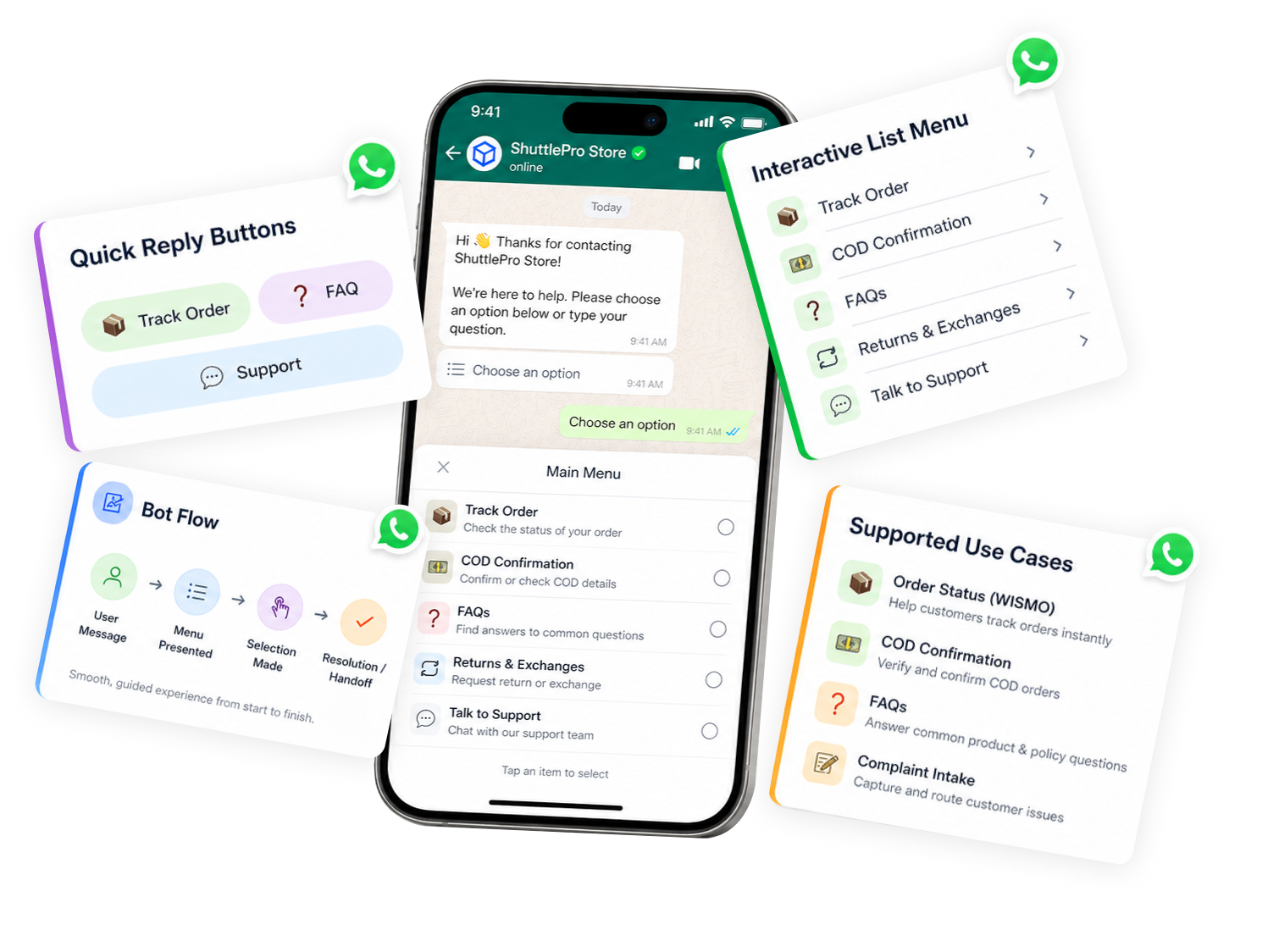
In ecommerce support, the issue is rarely “no reply”—it’s “no structure.” Interactive flows reduce ambiguity and help teams resolve operational tasks faster.
- COD confirmation — capture confirm/cancel choices and reasons consistently.
- Returns & exchanges — collect product, reason, and pickup details without guesswork.
- Complaint intake — classify issues before they hit the support queue.
- Address confirmation — avoid free-text confusion with structured responses.
faster resolution + fewer missed follow-ups.
How it Works
1
Choose a workflow
Start with a practical flow: COD, return, complaint, or order status.
2
Define structured inputs
Use WhatsApp buttons and list menus to collect exactly what the team needs.
3
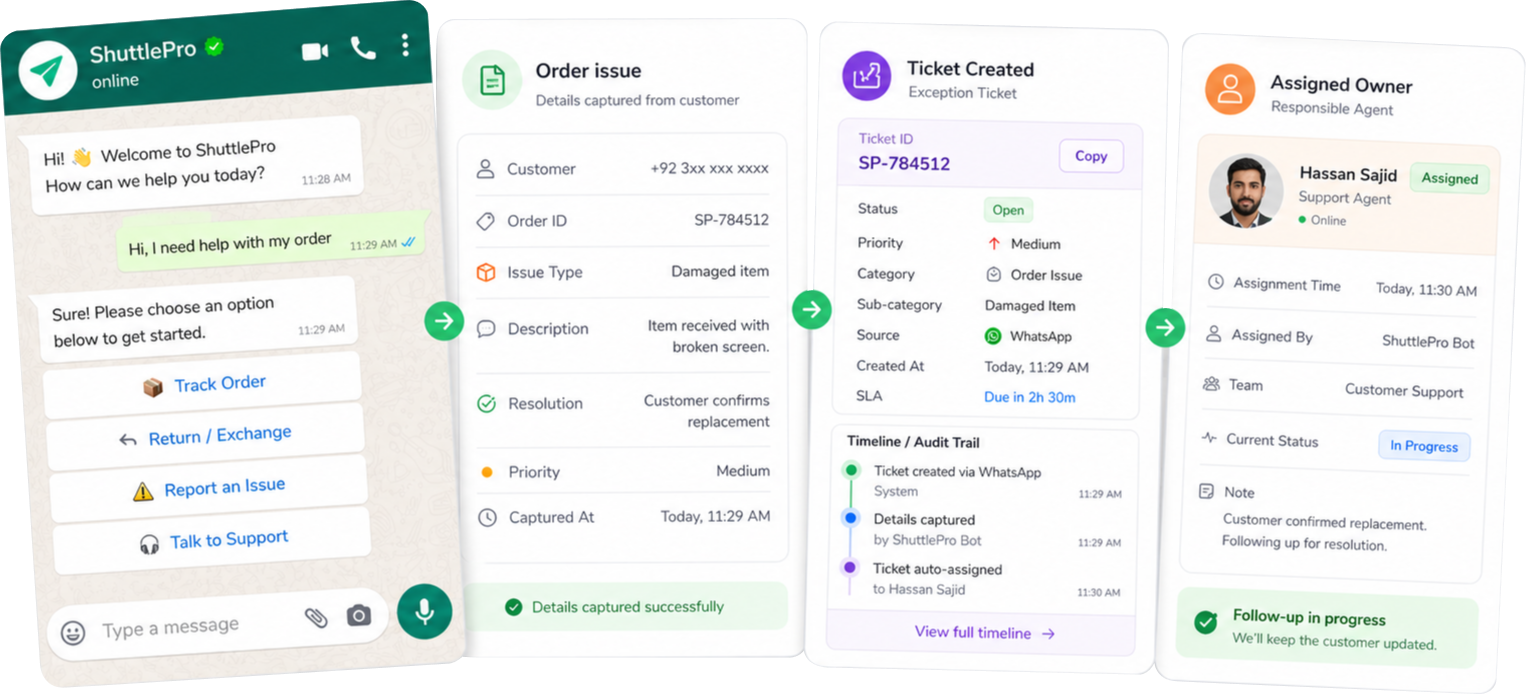
Route to the right queue
Based on user choices, send the case to the correct owner or team.
4
Create tickets for exceptions
Complaint and follow-up workflows can open tickets automatically.
5
Track via audit trail and KPIs
Review what happened later and improve handling over time.
Works best with WhatsApp Business API
Key Features
Interactive structure where teams need precision—plus ticketing and ownership when things need follow-up.
What you get
✓ WhatsApp buttons and list menus for structured inputs
✓ Capture complaint details consistently with less guesswork
✓ Convert flows into tickets for complaints and escalations
✓ Route to the right owner or team queue
✓ Works alongside AI bots (interactive for structure, AI for natural language)
Modules
Use cases for Pakistan Ecommerce
💵
COD Confirmation
Confirm / cancel + reason capture in a structured flow.
return Request
Collect product, reason and pickup details consistently.
Complaint Intake
Capture category, priority and evidence request in one flow.
Address Confirmation
Confirm or change address with a clean guided response.
Delivery Issue
Route “late/ not received/ wrong item” to the correct owner.
Sale-day triage
Route common issues quickly during high-volume periods.
What makes ShuttlePro different
Connected to ownership
Interactive flows connect to tickets and team ownership—not just replies.
Built for Pakistan workflows
Designed around COD, complaints, volume spikes, and WhatsApp-first support realities.
Expandable inside CRM
Works within a broader omnichannel CRM when you expand beyond WhatsApp.
FAQs
What are ShuttlePro WhatsApp Interactive Bots?
ShuttlePro WhatsApp Interactive Bots are predefined question-and-answer flows shown to customers in the form of buttons and list options. Instead of typing everything manually, customers can select the relevant option from the menu.
Each option can open another list of related options, allowing the business to create step-by-step flows for common queries and FAQs. If the customer wants to return to the starting point, they can press the “Main Menu” button to go back and choose another option.
This helps businesses guide customers through structured WhatsApp support journeys and reduce repeated manual replies before the conversation moves to the Shared Inbox or Unified Inbox for agent handling.
How are Interactive Bots different from ShuttleBot AI or Chatbots?
Interactive Bots are based on predefined options. Customers select from buttons, lists, and menu choices created by the business. The bot does not need to understand open-ended questions like an AI bot.
WhatsApp AI Chatbot and AI Bots are better for AI-based responses, while Interactive Bots are better for fixed flows where the customer should choose from available options such as “Order Status,” “Complaint,” “Return Request,” “Delivery Issue,” or “Main Menu.”
Businesses can use CRM + AI Bots together with Interactive Bots depending on how they want to manage automation, agent handover, and customer support workflows.
What types of workflows can be managed with ShuttlePro Interactive Bots?
ShuttlePro Interactive Bots can be used for workflows where the business already knows the common questions and possible answers. These may include order status options, FAQs, complaint categories, return requests, delivery issues, product inquiries, and customer support menus.
For example, a customer may select “Complaint,” then choose from another list such as “Late Delivery,” “Wrong Item,” “Damaged Product,” or “Payment Issue.” If the case needs follow-up, it can move into Ticketing so the team can manage ownership, status, and resolution properly.
These flows are especially useful for Customer Support Teams and eCommerce Ops teams handling repeated WhatsApp queries.
Can Interactive Bots create sub-menus for different customer queries?
Yes. Each button or list option can lead to another list of related options. This allows the business to create a complete menu-based support journey inside WhatsApp.
For example, the main menu may show “Orders,” “Complaints,” “Returns,” and “Talk to Agent.” If the customer selects “Orders,” another menu can show “Order Status,” “Order Confirmation,” or “Change Address.” The customer can also return to the Main Menu when needed.
When connected with WhatsApp CRM and WhatsApp Business API, these menu-based flows can help support teams manage structured WhatsApp journeys more professionally.
Can ShuttlePro Interactive Bots help route customers to agents or tickets?
Yes. If a customer selects an option that needs human support, ShuttlePro can route the conversation to the right agent, queue, or team inside the Shared Inbox.
For complaint-related options, the flow can also help create a support ticket through Ticketing so the issue can be tracked with ownership, status, and follow-up history.
When used with Audit Trail and Agent Performance, managers can review how cases were routed, handled, and resolved.
How do Interactive Bots help during high-volume support periods?
During sale days, campaigns, or order spikes, agents often receive the same questions again and again. Interactive Bots reduce this load by giving customers predefined options to choose from.
Customers can quickly select what they need, move through related menus, or return to the Main Menu without waiting for an agent. This helps the support team handle repetitive queries faster and focus more on cases that need manual attention.
For Pakistan retail and eCommerce teams, this is especially useful during COD, delivery, return, and complaint-heavy periods covered in Pakistan Retail Playbooks and eCommerce Ops.
Want to turn COD, returns, and complaints into structured flows?
“Share your top 5 customer queries and we’ll suggest whether AI, interactive flows, or both should handle them.”