

Integration • bring email into the same support workflow
Email Integration (Bring Email Support into One Workflow)
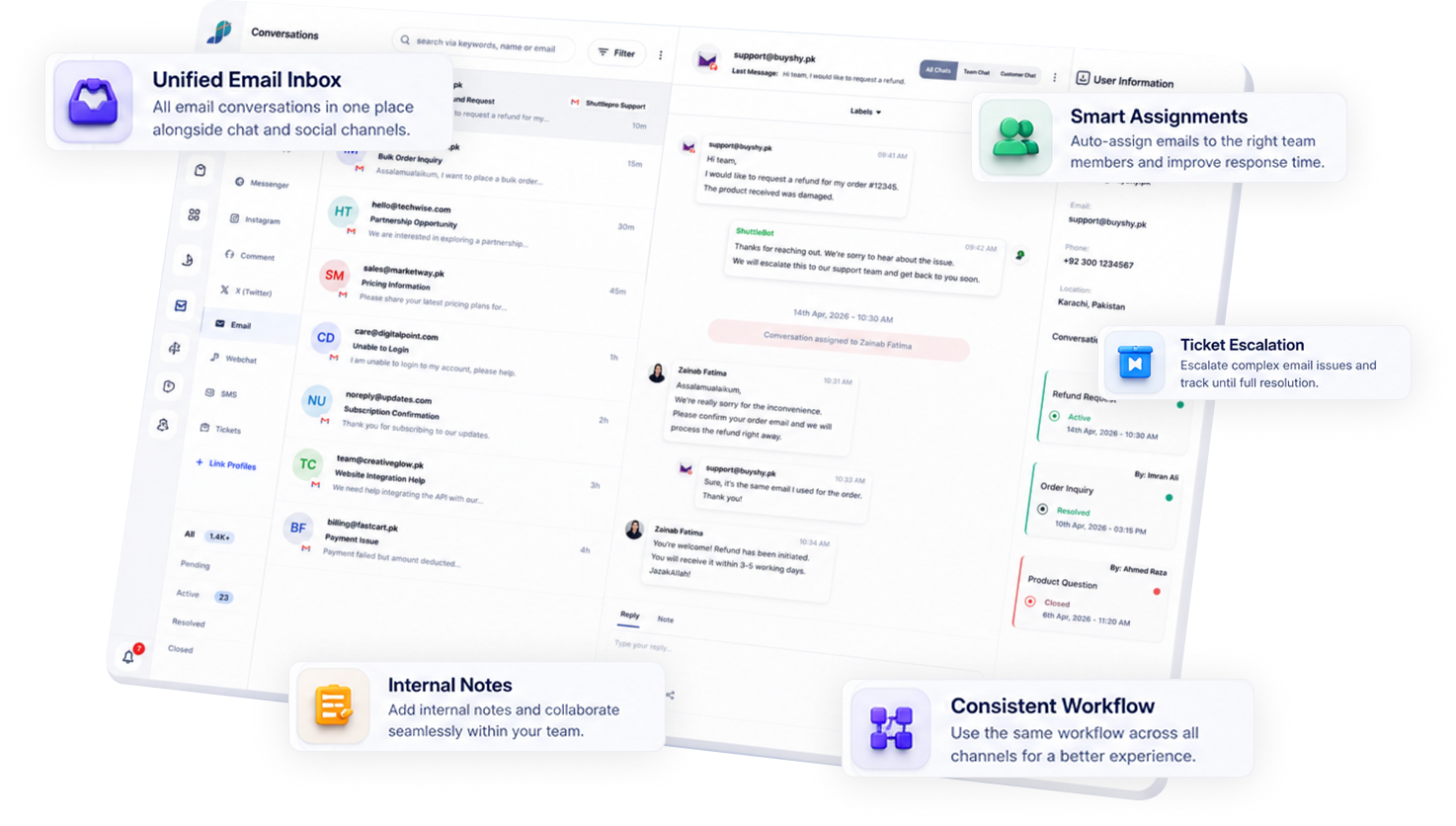
Email still matters for escalations, refunds, and official communication. ShuttlePro brings email conversations into the same shared inbox as WhatsApp and social DMs—so follow-ups stay owned and trackable.
Typical go-live: 2 -5 Days
ShuttlePro’s email integration brings email conversations into the same shared inbox as WhatsApp and social DMs—so teams can assign ownership, collaborate, and convert exceptions into tracked tickets.
Works best when WhatsApp Business API is connected too.

Why it matters
How it works
Connect → route → assign → escalate → review. No technical documentation on this page.
Most teams combine this with WhatsApp
1
Connect your support email
Connect your support email to ShuttlePro.
2
Route messages into the unified inbox
Emails appear alongside WhatsApp and social DMs.
3
Assign ownership + collaborate
Use assignments, internal notes, and handoffs.
5
Review outcomes (optional)
Use KPIs and audit trail for coaching and accountability (if enabled).
Related: Ticketing & complaints • Audit trail • Agent KPIs
Key Features
✓ Email handled inside the same inbox as WhatsApp/social
✓ Ownership and assignment to reduce missed follow-ups
✓ Internal collaboration and handoffs
✓ Ticket escalation for complaints/exceptions
✓ Consistent workflow across channels
Use cases (Ecommerce Support)
💸
Refund/escalation threads
Tracked with ownership instead of floating inboxes.
Courier/vendor escalations
Email escalations linked to ticketing and follow-ups.
Proof conversations
Invoices/screenshots attached to the same case.
Shift handoffs
Continuity across agents without re-explaining context.
What makes ShuttlePro different
Email isn’t isolated—it’s connected to WhatsApp-first operations.
WhatsApp-first operations
Email support connects to WhatsApp-first workflows (not a separate tool).
Courier/vendor escalations
Exceptions become tickets with ownership and accountability.
Omnichannel without rework
Expand into omnichannel without changing your workflow.
FAQs
Why should eCommerce teams connect email with ShuttlePro if most customers use WhatsApp?
Email is still important for official support conversations, refunds, escalations, vendor communication, courier follow-ups, invoices, attachments, and proof-based discussions. Even if most customer conversations start on WhatsApp, many serious or operational matters still move to email.
ShuttlePro Email Integration helps bring those email conversations into the same support workflow as CRM + AI Bots, Unified Inbox, and Customer Support Teams. This reduces context loss and helps teams manage email follow-ups with ownership, notes, tickets, KPIs, and audit visibility.
How does ShuttlePro manage email conversations inside the unified inbox?
ShuttlePro brings connected support emails into the same Unified Inbox where teams manage WhatsApp, social DMs, comments, and other customer interactions. This allows agents to handle email conversations with assignment, ownership, internal notes, and follow-up tracking instead of managing emails separately.
For support teams, this means email does not remain an isolated channel. It becomes part of the same operational workflow used across WhatsApp CRM, Shared Inbox, and broader eCommerce Ops support activity.
Can email conversations be assigned to specific agents or teams?
Yes. ShuttlePro allows email conversations to be assigned to the right agent, team, or workflow so every email follow-up has clear ownership.
This is useful for refund requests, complaint follow-ups, courier escalations, vendor communication, and official customer replies. When used with Agent Performance and Audit Trail, managers can review who handled the email, what actions were taken, and whether the follow-up was completed.
Can email escalations be converted into tickets in ShuttlePro?
Yes. If an email involves a complaint, refund, delivery issue, courier dispute, payment matter, or follow-up that needs tracking, the conversation can be connected with ShuttlePro’s Ticketing workflow.
This helps teams manage email-based escalations with ticket ownership, status, internal notes, and follow-up history. It also connects well with Customer Support Teams workflows where support cases need proper accountability instead of remaining buried in a normal email inbox.
How does Email Integration help with proof, attachments, and official communication?
Email is often used when customers or vendors share screenshots, invoices, payment proofs, delivery details, return evidence, or other official documents. ShuttlePro helps keep these email conversations connected to the support workflow so agents can reference the context when handling customer issues.
This is especially useful when an issue begins on WhatsApp CRM but requires proof or documentation over email. By keeping email connected with Ticketing and Audit Trail, teams can avoid scattered evidence and maintain a clearer history of the case.
Does ShuttlePro Email Integration replace our existing email system?
ShuttlePro Email Integration is designed to centralise email handling inside the support workflow, not necessarily replace every part of your existing email setup. The exact setup depends on how your business currently manages support emails and which channels need to be connected.
The goal is to make email conversations easier to assign, track, escalate, and review alongside WhatsApp Business API, AI Bots, Interactive Bots, and Pakistan Retail Playbooks workflows. This helps support teams manage email as part of customer operations rather than as a separate disconnected inbox.