

For custom stacks (OMS, couriers, internal tools)
API & Webhooks (Connect Your Stack to Support Operations)
Typical go-live: 2 -5 Days
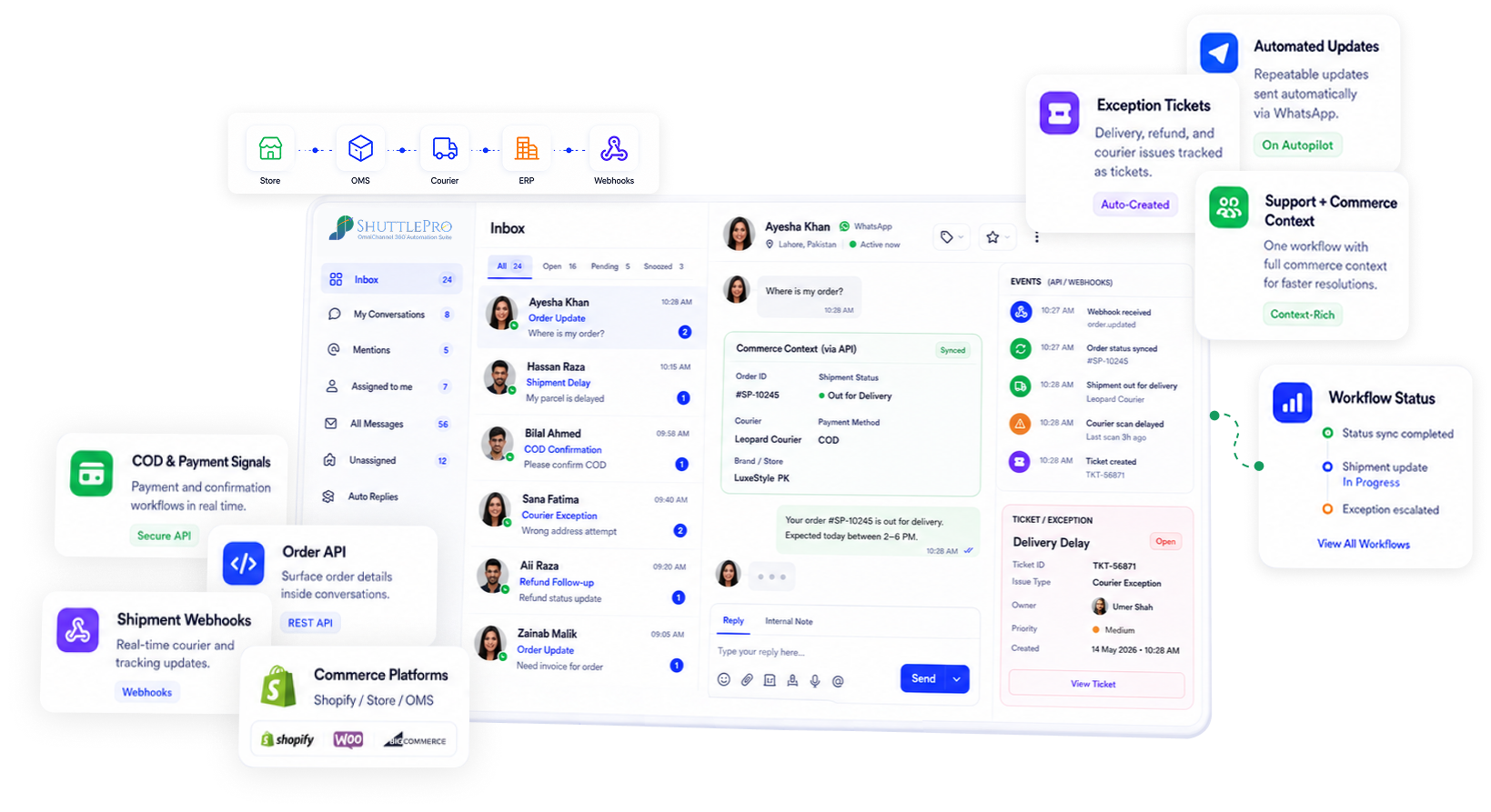
Why it Matters
APIs/webhooks close the “context gap” so Pakistan ecommerce support can move faster and stay accountable.
The context gap is the real bottleneck
In Pakistan ecommerce, support is often blocked by missing context:
- Order status lives in an OMS or courier portal
- Customer history sits in another tool
- Agents switch tabs and still miss follow-ups
Built for WhatsApp-first reality
- Faster answers on “where is my order?”
- Cleaner complaint handling (ticket + owner)
- Less “screenshot + spreadsheet” tracking
How it works
1
Identify systems to connect
OMS, couriers, internal tools—or any system that holds support-critical data.
2
Define the context support needs
Order status, shipment events, customer attributes, exception flags, and ownership rules.
3
Use API/webhooks to surface or sync
Expose relevant context inside the support view (scope depends on your stack).
4
Route exceptions into tickets
Turn operational “edge cases” into owned follow-ups (complaints, delivery disputes, returns).
5
Track outcomes with accountability
Use audit trails and KPIs (if enabled) to improve quality and coaching over time.
Typical go-live for core setup is 2–5 days. Custom integrations vary based on scope.
Typical workflows teams build
Realistic examples that translate directly into support operations (not “developer projects”).
Courier event → visible in conversation
Shipment milestones show up where the agent is already replying.
“Delivered but not received” → ticket
Complaint triggers a tracked case with ownership and follow-ups.
OMS status change → bot reply (where configured)
Keep customers updated without manual checks when context is available.
High-risk exception → routed to owner
Send specific exceptions to the right queue/agent based on rules.
What makes ShuttlePro different
- APIs/webhooks connect directly to the support workflow (inbox + tickets)
- Exceptions are tracked with ownership—not left in chat threads
- Audit trails support accountability without “manual evidence”
- WhatsApp-first reality (high volume + fast expectations)
- COD and delivery disputes need traceable follow-ups
- Expandable: start WhatsApp-first, then unify Instagram/Facebook/email
FAQs
What can ShuttlePro connect through APIs and webhooks?
ShuttlePro can use APIs and webhooks to connect support workflows with systems that hold important operational data, such as OMS platforms, courier systems, Shopify, internal dashboards, order tools, or custom business systems.
The goal is to bring useful context into ShuttlePro’s CRM + AI Bots workflow and Unified Inbox. For example, agents may need order status, shipment updates, customer details, exception flags, courier events, or return information while replying to customers. APIs and webhooks help make that context available without forcing agents to switch between multiple tools.
How do APIs and webhooks improve customer support in ShuttlePro?
APIs and webhooks help ShuttlePro reduce the “context gap” between customer conversations and operational systems. When support teams can see relevant order, shipment, or customer information inside the Unified Inbox, they can respond faster and manage exceptions more accurately.
This is especially useful for Customer Support Teams and eCommerce Ops where many queries are related to order status, delivery delays, COD issues, returns, or courier disputes. Instead of checking external systems manually, teams can use connected data to support faster replies and better follow-ups.
Can ShuttlePro use courier or shipment events inside support workflows?
Yes. Where courier systems provide usable data or webhook events, ShuttlePro can use those events to improve support visibility. For example, shipment milestones, delivery exceptions, failed delivery attempts, or “delivered but not received” cases can be surfaced inside the support process.
This helps agents respond with better context inside WhatsApp CRM or the Shared Inbox. If the issue needs follow-up, ShuttlePro can route the case to the right owner or create a support ticket through Ticketing so the exception is tracked instead of remaining inside a normal chat thread.
Can APIs and webhooks trigger tickets or escalations in ShuttlePro?
Yes. APIs and webhooks can support exception-based workflows where certain events or conditions trigger a ticket, escalation, assignment, or follow-up process inside ShuttlePro.
For example, a courier exception, refused order, return request, delayed shipment, or complaint signal can be routed into Ticketing. The ticket can then have ownership, status, internal notes, follow-up history, and visibility through Audit Trail and Agent Performance where enabled.
Can APIs and webhooks work with ShuttlePro AI Bots and WhatsApp workflows?
Yes. APIs and webhooks can help ShuttlePro’s AI Bots and WhatsApp AI Chatbot use connected business data while responding to customer queries.
For example, if a customer asks about order status, delivery progress, product availability, or a complaint update, the bot can use connected data where configured. Businesses can also combine API-based workflows with Interactive Bots to guide customers through structured options such as order status, COD confirmation, complaint intake, or return requests.
What is the best way to start with APIs and webhooks in ShuttlePro?
The best starting point is to identify the support blockers your team faces most often. Common examples include agents checking courier portals manually, customers repeatedly asking for order status, complaints being tracked in spreadsheets, or delivery exceptions not reaching the right team quickly.
Once those blockers are clear, ShuttlePro can help decide which systems should be connected first and which events should be surfaced inside the support workflow. Many Pakistan Retail teams start with WhatsApp Business API and order context, then add courier events, exception routing, ticket triggers, and performance visibility as their support process becomes more structured.