

Customer Support Operations for Ecommerce Teams in Pakistan
Typical go-live: 2 -5 Days
Why it Matters
Pakistan ecommerce support is high‑volume and WhatsApp‑first. Without a system, teams lose ownership and accountability.
✓ Agents reply from phones with unclear ownership
✓ Order status and COD questions consume time
✓ Complaints get handled in chat threads (no tracking)
✓ Performance and accountability are hard to measure
Outcome: One Workflow from Conversation → Escalation → Resolution.
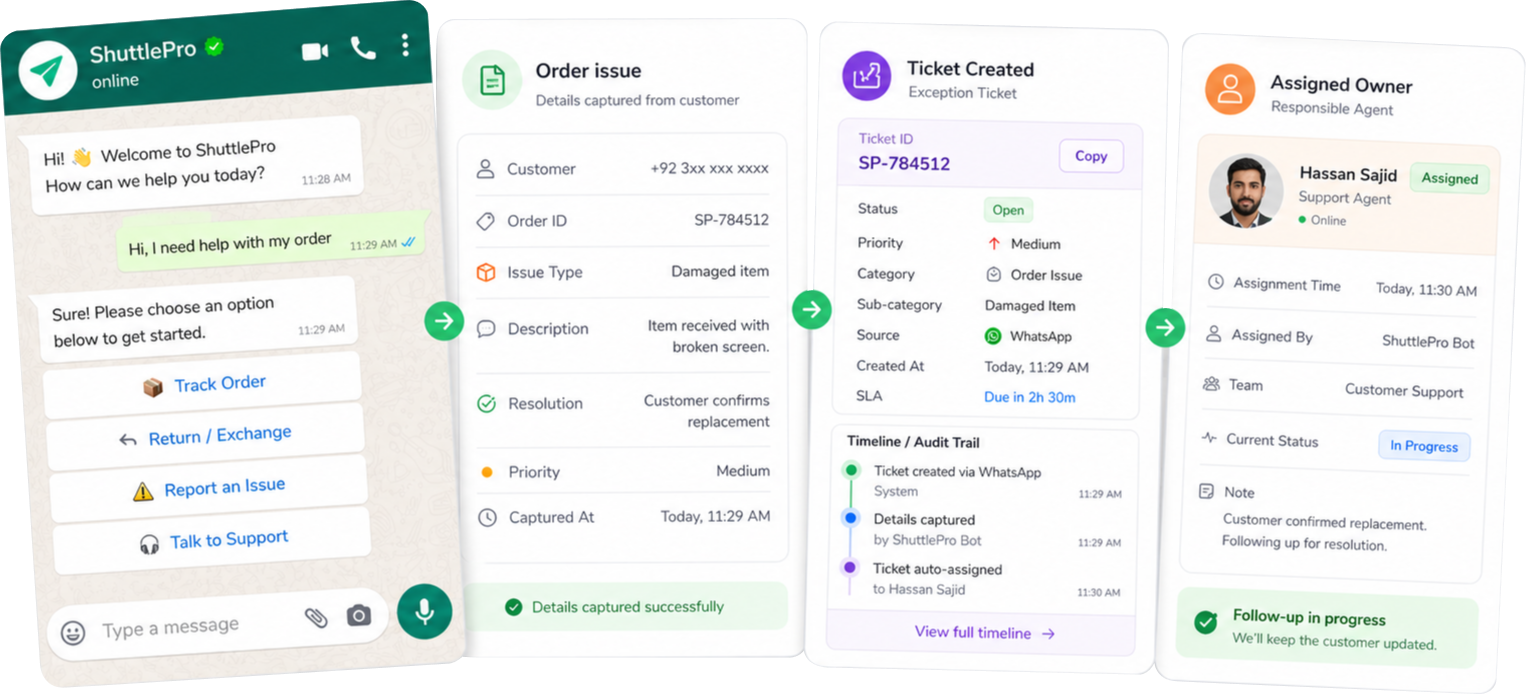
What all solutions share
Move WhatsApp and DMs into one shared inbox with ownership and assignment.
Convert complaints and follow-ups into tickets so escalations don’t get lost.
Use AI bots/interactive flows for order status, COD and FAQs—escalate exceptions safely.
How it Works
Typical go-live: 2-5 Days
1
Connect WhatsApp first, then expand
Start WhatsApp-first and later add Instagram/Facebook/email into the same workflow.
2
Route conversations into a unified inbox
Set ownership rules so every thread has a responsible agent/team.
3
Define top intents + escalation triggers
Pick what should be automated vs what should go to humans (complaints, exceptions).
4
Use tickets for tracked follow‑ups
Convert complaints and exceptions into tickets for clear ownership and resolution.
5
Review quality with KPIs + audit trails
Measure patterns, coach consistently, and reconstruct what happened on escalations.
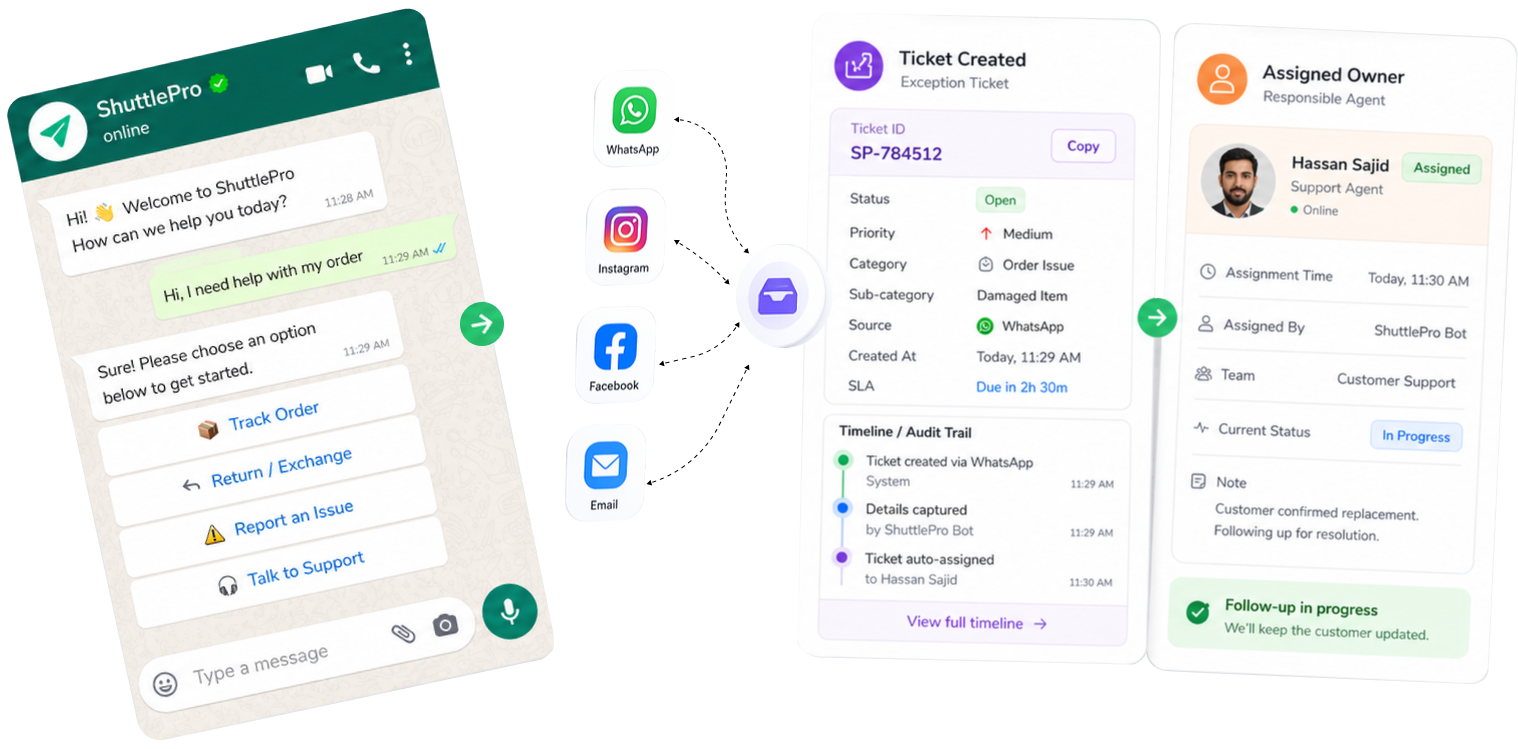
Before
WhatsApp on phones + ad‑hoc spreadsheets + missed follow-ups.
With ShuttlePro
One inbox + tickets + accountable resolution + measurable performance.
Common workflows we help teams fix
Concrete use cases that match WhatsApp-first customer behavior—especially COD and post‑purchase support.
Order status automation
COD confirmation flows
Structured capture + exception routing to reduce disputes.
Complaint intake → ticket
Returns & exchanges
Sale-day spikes
Triage and route volume without breaking the team.
Shift handoffs
What makes ShuttlePro different
Designed for operational clarity: keep conversations attached to ticket outcomes, performance visibility and accountability.
✓ WhatsApp-first operations built for Pakistan ecommerce reality
✓ Not just chat: inbox → automation → ticketing → outcomes
✓ Accountability built-in: KPIs + audit trail support QA and coaching
✓ Commerce context integrations available (Shopify, OMS, couriers via APIs/webhooks)
Outcome: One Workflow from Conversation → Escalation → Resolution.
Before
✓ WhatsApp on phones + shared spreadsheets
✓ Instagram/Facebook DMs handled
separately
✓ Complaints tracked in ad‑hoc tools
✓ No consistent KPIs or audit trail
With ShuttlePro
✓ Unified inbox for all support channels
✓ AI bots + interactive flows for repetitive intents
✓ Tickets for complaints, escalations and follow‑ups
✓ KPIs + audit trails for accountability and QA
FAQs
How does ShuttlePro help customer support teams move away from phone-based WhatsApp handling?
ShuttlePro helps support teams move WhatsApp conversations from individual phones into a structured WhatsApp CRM and Unified Inbox workflow. Instead of agents replying from separate devices with unclear ownership, teams can manage conversations inside a shared inbox with assignment, statuses, internal notes, and follow-up visibility.
This helps managers see which conversations are pending, active, resolved, or closed, while agents know exactly which customer queries they are responsible for. It is especially useful for Customer Support Teams handling high message volume, order status questions, COD queries, complaints, and sale-day support spikes.
How does ShuttlePro help support teams decide what should be centralized, ticketed, or automated?
ShuttlePro helps support teams start by centralizing customer conversations first through the Shared Inbox and CRM + AI Bots workflow, then identifying which queries need tickets and which workflows can be automated. This prevents teams from over-automating before they understand their real support patterns.
For example, general product questions may stay as conversations, complaints may move into Ticketing, and repetitive order status or COD-related queries may be handled through AI Bots, Interactive Bots, or automation rules. This gives support managers a practical rollout path instead of forcing every workflow into the same process.
How does ShuttlePro help support teams manage sale-day spikes and high-volume queries?
During sale days, product launches, or campaigns, customer support teams often face sudden spikes in WhatsApp messages, social DMs, comments, order status queries, and complaints. ShuttlePro helps teams manage this load by organizing conversations in one Unified Inbox and giving managers visibility into pending work, assigned agents, and ticket activity.
Teams can use WhatsApp AI Chatbot or Interactive Bots for repeated queries, while agents focus on exceptions, complaints, and high-priority follow-ups. This is especially useful for eCommerce Ops teams that need faster responses without losing ownership or customer context during busy periods.
How does ShuttlePro improve complaint handling for customer support teams?
ShuttlePro helps support teams manage complaints as tracked work instead of leaving them only inside chat threads. A customer conversation can create one or multiple complaint tickets through Ticketing, and each ticket can stay connected with the original conversation.
This allows the ticket handler to read the conversation, reply to the customer when needed, update ticket details, and add internal comments for the team. Managers can then review ownership, status, follow-up history, and activity through Audit Trail to make complaint resolution more accountable.
How does ShuttlePro support shift handoffs between agents or teams?
ShuttlePro supports shift handoffs by keeping conversations, internal notes, assignments, tickets, and customer context in one Shared Inbox workflow. When a case moves from one agent or shift to another, the next handler can review what happened earlier instead of asking the customer to repeat the issue.
This is useful for support teams working in shifts or managing high-volume queries across multiple agents. With WhatsApp Business API connected to ShuttlePro, teams can manage WhatsApp support more professionally with shared access, better visibility, and clearer handoffs.
How can managers measure support quality and team performance in ShuttlePro?
ShuttlePro helps managers measure support quality through Agent Performance, ticket visibility, workload tracking, and audit trails. Managers can review how many queries agents handle, how many are pending or resolved, response patterns, follow-up behavior, ticket handling, and escalation activity.
When used with Audit Trail and Pakistan Retail Playbooks, ShuttlePro helps supervisors identify slow responses, unresolved complaints, overloaded agents, and process gaps. This gives support leaders real operational data for coaching, QA reviews, and improving customer experience over time.