

Complaint management + Ticketing for WhatsApp-first support
Ticketing & Complaint Management from WhatsApp Chat
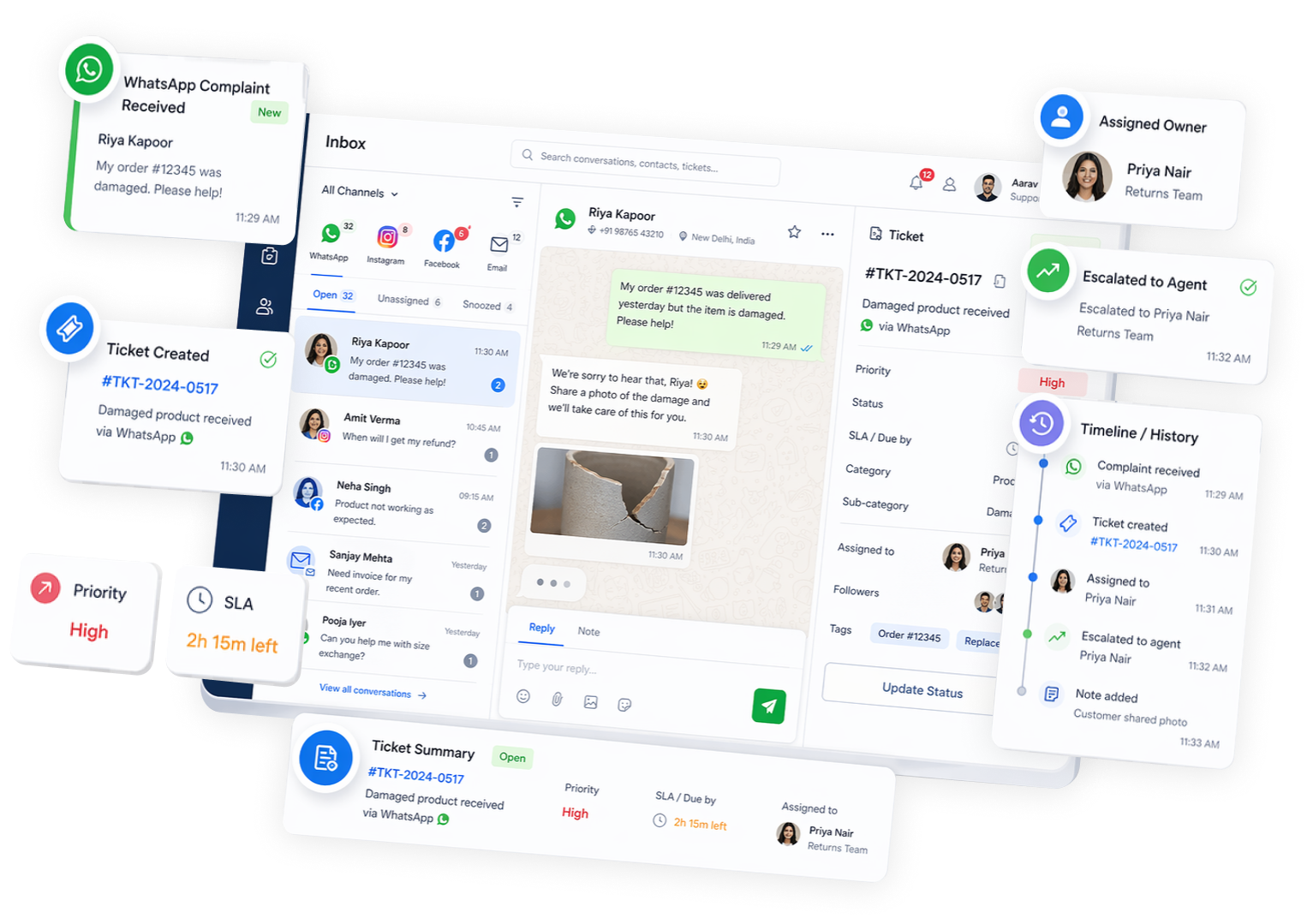
Turn WhatsApp and omnichannel conversations into tracked tickets for complaints, escalations, and follow-ups— with clear ownership, priority, and an auditable history.
Typical go-live: 2 -5 Days
ShuttlePro Ticketing turns WhatsApp and omnichannel conversations into tracked tickets for complaints, escalations, and follow-ups—created manually, via AI, or via WhatsApp interactive flows—with ownership and accountability.
Why it Matters
When support stays as “just chat,” escalations disappear:
• Complaints get handled in long threads
• Follow-ups rely on memory
• Ownership is unclear
• The same issue gets reopened again and again
How it Works
A simple operational flow: Escalation → Ticket → Owner → Resolution → Audit.
1
Detect an escalation
Agent marks it, AI flags it (where configured), or the customer triggers it via interactive options.
2
Create a ticket with context attached
The conversation history stays connected so your team doesn’t lose details.
3
Assign ownership and set priority
Route to the right agent/team; track status without relying on spreadsheets.
4
Work the ticket with clear collaboration
Internal notes and updates help the team handle exceptions consistently.
5
Close the loop with an auditable history
Review what happened, when, and who changed what—useful for QA and accountability.
Key Features
- Ticket creation from WhatsApp conversations and other channels
- Auto ticket creation via AI intent detection(where configured)
- Ticket creation via WhatsApp Interactive Bot inputs(structured complaint capture)
- Ownership, priority, statuses, and internal notes
- Tickets connected to Agent KPIsand Audit trail
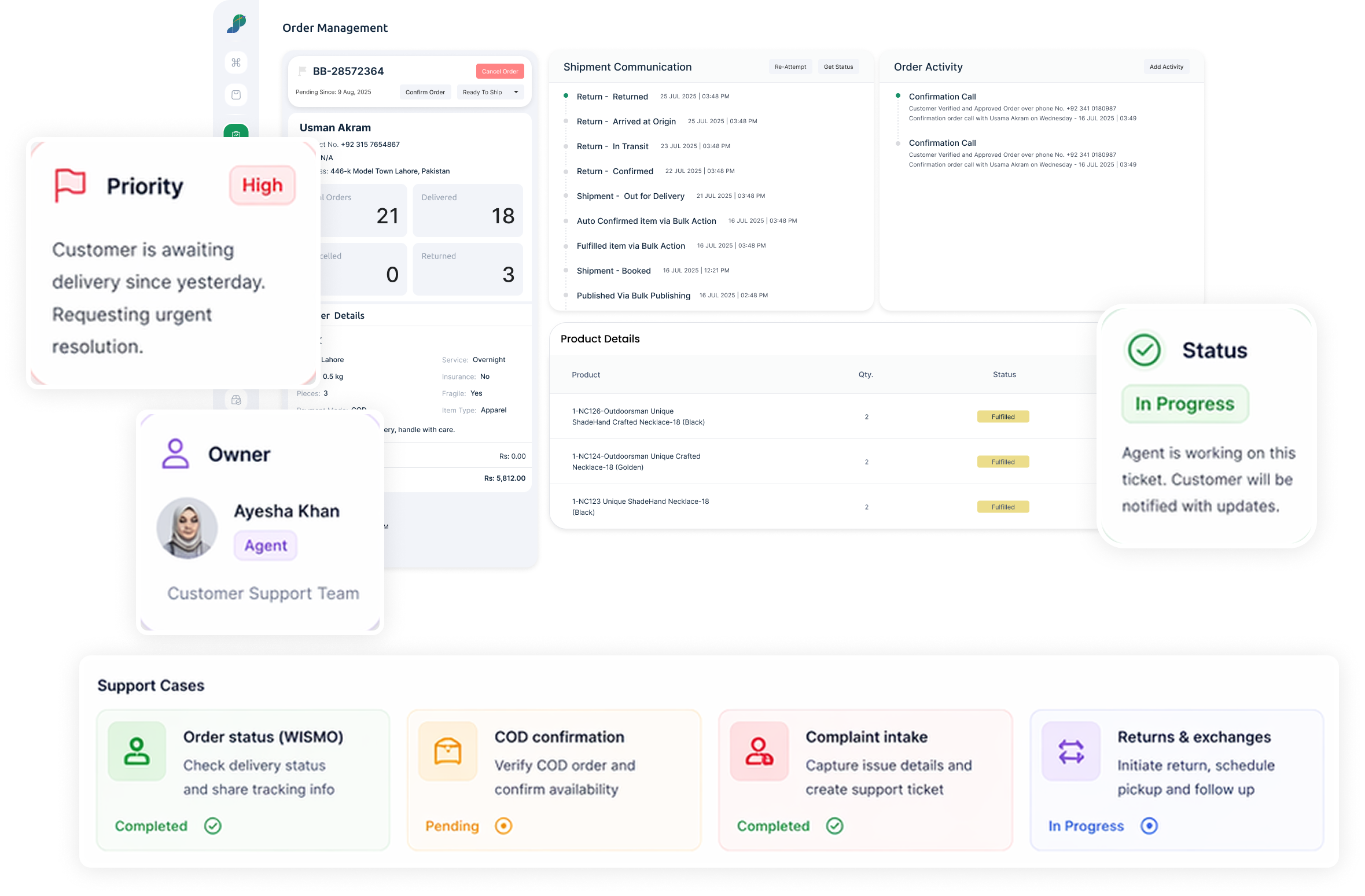
Recommended phase 1 intents
• Order status (WISMO)
• COD confirmation
• Complaint intake → ticket
• Returns & exchanges (structured follow-up)
Use Cases
Built for Pakistan Ecommerce
Late delivery complaints
Ticket + owner + tracked follow-up from WhatsApp escalation.
Wrong Item / Damaged Item
Structured complaint capture via WhatsApp interactive flow.
Returns & exchanges
Track the entire resolution with clear status updates.
Courier disputes
Keep evidence and timeline in one place, tied to the conversation.
Sale-day escalations
Convert exceptions into tickets while bots handle repetitive volume.
High-priority follow-ups
Don’t rely on memory—use priority + ownership to close the loop.
Differentiators
Operations-first CRM — not jst messaging
- Tickets are connected to the unified inbox (not isolated from conversations)
- WhatsApp-first, built around how Pakistan ecommerce support actually works
- Ticket creation can be triggered by AI or interactive WhatsApp flows
- Accountability supported by KPIs + Audit trails
Before
- Complaints lost in long WhatsApp threads
- Follow-ups tracked in spreadsheets
- No clear ownership or priority
With ShuttlePro
- Ticket created from chat with context
- Owner + priority + status updates
- Audit trail for QA and accountability
FAQs
What types of customer issues can become tickets in ShuttlePro?
In ShuttlePro, a single customer conversation can create one or multiple tickets/complaints when different issues need separate follow-up. For example, the same customer conversation may include a delivery complaint, a return request, and a product issue — each can be handled as a separate ticket while staying connected to the original conversation.
This helps support teams manage delayed deliveries, wrong or damaged items, returns, exchanges, courier disputes, payment concerns, and high-priority follow-ups without losing context. The ticket handler can read the related conversation, reply to the customer when needed, and add internal comments inside the ticket for team coordination.
How can tickets be created inside ShuttlePro?
Tickets in ShuttlePro can be created in different ways depending on the workflow. An agent can create a ticket manually from a customer conversation, while automation can help create tickets when a complaint, escalation, or follow-up condition is detected.
Tickets can also be created through structured flows, such as WhatsApp Interactive Bots, where the customer provides required details through buttons or guided steps. This helps teams collect cleaner complaint information and route the issue to the right person faster.
How does ShuttlePro keep tickets connected to the original conversation?
ShuttlePro keeps tickets connected with the original customer conversation inside the Unified Inbox, so the ticket handler can understand the full context before taking action.
A single conversation can create multiple tickets or complaints, and each ticket remains linked to the conversation history. The ticket handler can read previous customer messages, reply to the customer directly, update ticket details, and add internal comments that are visible to the team but not sent to the customer.
This helps support teams manage complaints and follow-ups without switching between disconnected tools or asking the customer to repeat the same information.
How does ShuttlePro help teams assign ownership and priority to tickets?
ShuttlePro helps support teams assign tickets to the right agent, department, or team, so every complaint or follow-up has a clear owner. Tickets can be organized by status, priority, category, and internal notes, making it easier to understand what needs action and who is responsible.
This is especially useful during high-volume periods, sale days, or when multiple teams are handling delivery issues, returns, exchanges, or complaint escalations. Clear ownership helps reduce missed follow-ups and improves accountability across the support workflow.
Can ShuttlePro ticketing support delivery, returns, and courier-related complaints?
Yes. ShuttlePro ticketing can support practical eCommerce complaint workflows such as late delivery, refused orders, wrong items, damaged items, returns, exchanges, courier disputes, payment issues, and urgent follow-ups.
Each issue can be tracked as a ticket with ownership, status, customer context, and internal comments. Where order, courier, Shopify, or OMS context is available, the team can use that information to understand the issue faster and manage the complaint more efficiently.
How do Agent KPIs and Audit Trail improve ticket handling in ShuttlePro?
ShuttlePro connects ticketing with Agent Performance and Audit Trail so managers can review how complaints and escalations are handled.
Agent KPIs help managers understand workload, ticket ownership, follow-up activity, and support quality. Audit Trail helps track what happened inside a ticket — including status changes, ownership changes, replies, updates, and internal actions. This makes complaint handling more accountable and helps support leaders improve team performance over time.